

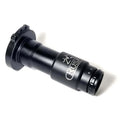
Monocular Adapter For Thermal Clip Ons 3X
Back in stock · restocked 4 NovBe the first to review · Ask a question SKU: MS-OK3XThanks — we'll email you when it's back.
Transform your thermal clip-on into a powerful Thermal Monocular using the innovative adapter from Rusan! Designed to seamlessly integrate with the Rusan Modular system (available separately), this monocular attachment effortlessly converts your thermal clip-on into a high-performance 3x thermal monocular.
Experience swift detachment of the monocular attachment, allowing you to effortlessly transition back to your day optic setup in no time. Explore the versatility and convenience of Rusan's Thermal Monocular adapter today
[embed]https://youtu.be/SjFsQvcdsOM[/embed]
Shipping policy
Shipping Policy
Here's how shipping works at Hunt The Night. Your exact shipping cost shows at checkout before you pay. If something isn't covered here, call 1300 486 444 or email contact@huntthenight.com.au.
Where we ship
We ship within Australia and to New Zealand. A few products can't be sent to every state. If that applies to your order, checkout won't offer shipping to that address.
Shipping costs: Australia
● Standard, orders under $1,000: $20
● Standard, orders of $1,000 or more: no shipping charge
● Express Post, orders under $2,000: $28
● Express Post, orders of $2,000 or more: no shipping charge
● Bulky items (tripods, gun bags and the like), any order total: $40
● Bulk projectile packs: $100 (Standard only)
Bulky items ship Standard, even if you pick Express Post.
Shipping costs: New Zealand
● Standard: $45
● Bulky items: $60
When will my order ship?
The product page tells you how each item ships: in stock with us, ships from supplier, pre-order, special order or backorder. Pre-orders show when they're due. Special orders show the usual shipping time in business days. Backorders ship when they land with us.
If your order has a pre-order, special order or backorder item in it, the whole order ships together once everything's here.
What can't be shipped?
We can't ship ammunition, primers, safes or anything else marked pickup only. You collect those from our Pakenham store:
Hunt The Night, 1205 Koo Wee Rup Road, Pakenham VIC 3810
Mon to Wed and Fri 8:30am to 5:30pm, Thu 8:30am to 7:30pm, Sat 9am to 3pm, Sun closed.
Firearms
Firearms only go to a licensed dealer, or you pick them up from us with a valid PTA (permit to acquire). To have one shipped, fill in the Dealer to Dealer section on the product page. We contact your dealer and arrange the shipping. Your dealer handles the PTA and the handover to you.
Return postage
● Change of mind: you pay the postage to send it back. Change of mind items are exchanged or swapped for store credit, not refunded.
● Wrong item sent by us: we send you a return label at no cost, and you can ask for a full refund.
● Faulty items are a warranty matter. Use the warranty request form.
● There's no restocking fee.
Please wait for our approval before you post anything back. Start with the Request a Return form. Full return rules are in our Refund Policy.
Refund policy
Returns Policy
We want you to be completely satisfied with your purchase. If for any reason you're not, we're here to help! Please review our return policy below:
Return Eligibility:
● Returns: You may return new, unopened items within 30 days of purchase or delivery for store credit or an exchange for another product, except for the exclusions listed below.
● Change of Mind purchases are not eligible for return, only exchange or store credit.
● Exclusions: Certain items are not eligible for returns AND exchanges, including:
○ Ammunition
○ Primers/Explosives
○ Rifles
○ Clearance items
Return Process:
1. To initiate an online return, please follow the instructions provided on our return request page: Request a Return
2. For in-store returns, please contact Hunt The Night/Pakenham Outdoors directly at 1300 486 444 and select the appropriate option for your return.
3. Condition of Items: Items must be unused, in their original packaging and product tags must be present and in original condition to be eligible for return. If the item is opened or used, it may not be eligible for a refund or exchange. (Conditions are subject to staff discretion)
Return Due to Our Error:
● If the return is a result of our error (e.g., we sent you the wrong item), we will provide you with a return shipping label at no cost to you.
● In this case, you will also have the option to receive a full refund.
Faulty Items:
● A faulty item is a warranty matter, not a return due to our error. We'll help you make a warranty claim with the maker or supplier, for a repair or replacement under warranty. Start with our warranty request form.
● This doesn't change your rights under the Australian Consumer Law. See the Warranty Policy below.
Refunds and Store Credit:
● For eligible returns, we offer either store credit or an exchange for another product.
● Refunds will only be issued at the discretion of staff and/or if the return is due to an error on our part (as mentioned above)
How to Contact Us:
For any questions or concerns, please reach out to our customer service team via our website or call 1300 486 444 for in-store return assistance.
Layby Purchases
Layby purchases must be paid off in full within 8 weeks of paying the deposit. You can pay off the balance in part-payments of any amount, at any time, within those 8 weeks. A 7-day grace period applies after the due date, with no late fees. If you cancel, or the layby is not paid off by the due date (plus the 7-day grace period), we keep the deposit or 20% of the total order value, whichever is more, out of the payments you have already made. We will not seek any further amount, and anything you have paid above that will be refunded.
Warranty Policy
Our goods come with guarantees that cannot be excluded under the Australian Consumer Law (ACL).
If a product is returned under a warranty claim and is found to have no fault, the purchaser will be responsible for all associated costs, including inspection, handling, and return postage.
We appreciate your understanding and look forward to seeing you again!
Assembly guide
- The partsNocpix MATE, Rusan MCR-M52 modular connector and Rusan MS-OK3X 3× ocular.Whether HTN's 3× listing includes the connector to confirm
- Fit the connectorScrew the MCR-M52 connector onto the MATE's M52×0.75 thread. If the MATE is on a scope, unlock it from the clamp and leave the connector on.Clamp release method to confirm
- Fit the ocularLine up the arrows, push the ocular's adapter onto the connector and twist to lock.Twist direction to confirm
- Switch to monocularIn the menu, set Eyepiece to Monocular mode.
- Focus your eyeTurn the ocular's diopter (+ / 0 / −) until the image is sharp.
- The partsHIKMICRO Thunder TH35C 3.0, Rusan MCR-M52 modular connector and Rusan MS-OK3X 3× ocular.Whether HTN's 3× listing includes the connector to confirm
- Fit the connectorScrew the MCR-M52 connector onto the Thunder's M52×0.75 thread. Tighten the fixing ring with the supplied wrench. If the Thunder is on a scope, unlock it from the clamp and leave the connector on.Clamp release method to confirm
- Fit the ocularLine up the arrows, push the ocular's adapter onto the connector and twist to lock.Twist direction to confirm
- Switch to monocularSet the eyepiece type to Monocular (Menu › Advanced Settings, or double-press the Mode key).
- Focus your eyeTurn the ocular's diopter (+ / 0 / −) until the image is sharp.
- The partsHIKMICRO Thunder TQ35CL 3.0, Rusan MCR-M52 modular connector and Rusan MS-OK3X 3× ocular.Whether HTN's 3× listing includes the connector to confirm
- Fit the connectorScrew the MCR-M52 connector onto the Thunder's M52×0.75 thread. Tighten the fixing ring with the supplied wrench. If the Thunder is on a scope, unlock it from the clamp and leave the connector on.Clamp release method to confirm
- Fit the ocularLine up the arrows, push the ocular's adapter onto the connector and twist to lock.Twist direction to confirm
- Switch to monocularSet the eyepiece type to Monocular (Menu › Advanced Settings, or double-press the Mode key).
- Focus your eyeTurn the ocular's diopter (+ / 0 / −) until the image is sharp.
- The partsHIKMICRO Thunder TQ50CL 3.0, Rusan MCR-M52 modular connector and Rusan MS-OK3X 3× ocular.Whether HTN's 3× listing includes the connector to confirm
- Fit the connectorScrew the MCR-M52 connector onto the Thunder's M52×0.75 thread. Tighten the fixing ring with the supplied wrench. If the Thunder is on a scope, unlock it from the clamp and leave the connector on.Clamp release method to confirm
- Fit the ocularLine up the arrows, push the ocular's adapter onto the connector and twist to lock.Twist direction to confirm
- Switch to monocularSet the eyepiece type to Monocular (Menu › Advanced Settings, or double-press the Mode key).
- Focus your eyeTurn the ocular's diopter (+ / 0 / −) until the image is sharp.
- The partsThermTec Hunt 650 Pro, Rusan MCR-M52 modular connector and Rusan MS-OK3X 3× ocular.Whether HTN's 3× listing includes the connector to confirm
- Fit the connectorScrew the MCR-M52 connector onto the Hunt's M52×0.75 thread. If the Hunt is on a scope, unlock it from the clamp and leave the connector on.Clamp release method to confirm
- Fit the ocularLine up the arrows, push the ocular's adapter onto the connector and twist to lock.Twist direction to confirm
- Switch to monocularSet Menu › Eyepiece Type to Monocular.
- Focus your eyeTurn the ocular's diopter (+ / 0 / −) until the image is sharp.
- The partsThermTec Hunt 335 Pro, Rusan MCR-M52 modular connector and Rusan MS-OK3X 3× ocular.Whether HTN's 3× listing includes the connector to confirm
- Fit the connectorScrew the MCR-M52 connector onto the Hunt's M52×0.75 thread. If the Hunt is on a scope, unlock it from the clamp and leave the connector on.Clamp release method to confirm
- Fit the ocularLine up the arrows, push the ocular's adapter onto the connector and twist to lock.Twist direction to confirm
- Switch to monocularSet Menu › Eyepiece Type to Monocular.
- Focus your eyeTurn the ocular's diopter (+ / 0 / −) until the image is sharp.
- The partsThermTec Hunt 650L, Rusan MCR-M52 modular connector and Rusan MS-OK3X 3× ocular.Whether HTN's 3× listing includes the connector to confirm
- Fit the connectorScrew the MCR-M52 connector onto the Hunt's M52×0.75 thread. If the Hunt is on a scope, unlock it from the clamp and leave the connector on.Clamp release method to confirm
- Fit the ocularLine up the arrows, push the ocular's adapter onto the connector and twist to lock.Twist direction to confirm
- Switch to monocularSet Menu › Eyepiece Type to Monocular.
- Focus your eyeTurn the ocular's diopter (+ / 0 / −) until the image is sharp.
Sources
- Nocpix MATE Series User Manual: components, installation and the Eyepiece menu.
- Rusan product catalogue 02/2024: modular clamp, connector and ocular.
- HIKMICRO Thunder 3.0 user manual: M52×0.75 adapter, fixing ring, eyepiece type and Calibrate Image.
- ThermTec Hunt Pro series user manual: M52×0.75 thread, bayonet-type ring, Zero Profile and Eyepiece Type.
- ZEISS DTC 3/38 instruction manual (reproduced by Optics Trade): lock ring and adapter fitting.
- Rusan modular adapter description (Venari): push-and-twist bayonet and alignment arrows.